Visual CSS / SCSS editor
.css and .scss files have Code / Split / Design / Preview (bottom right of the editor).
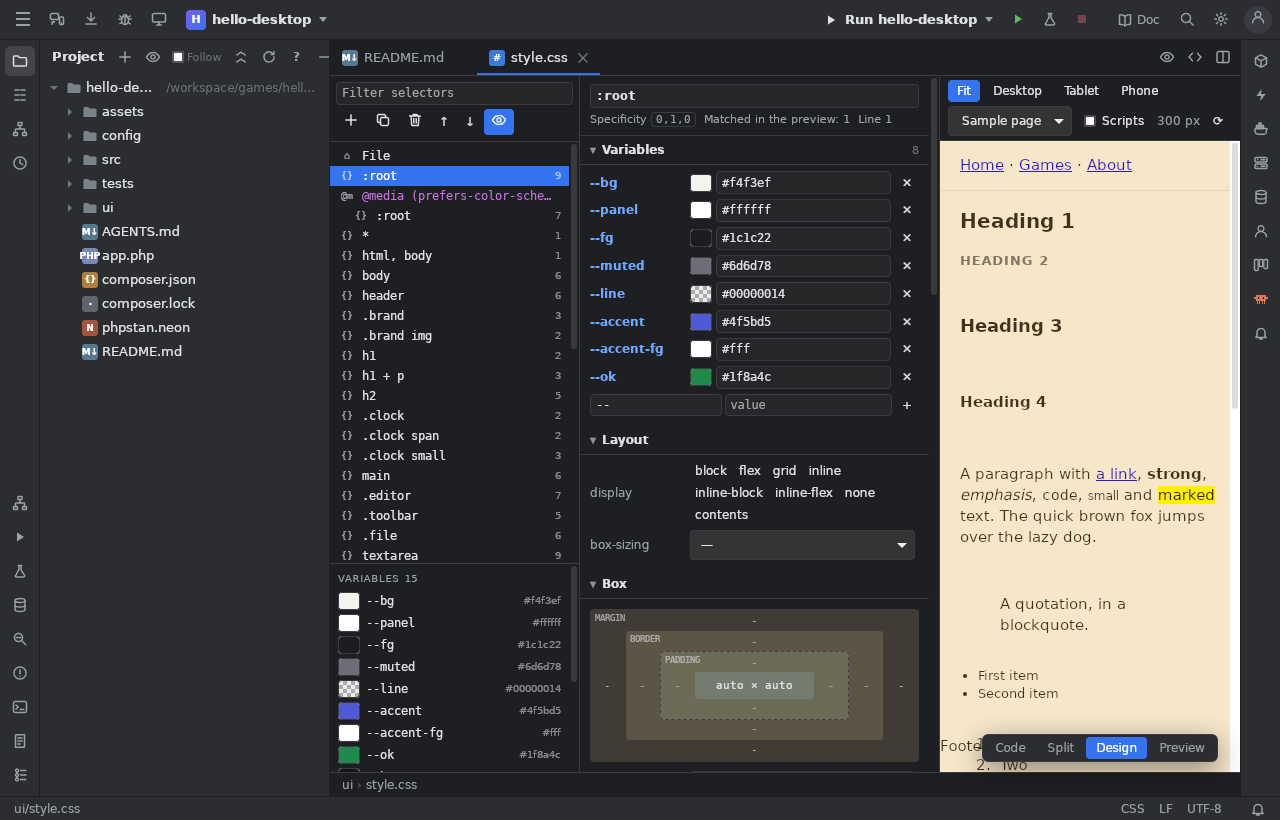
Design
- Rules (left): a tree of the file's rules,
@media/@supports/@container/@layergroups,@font-face,@keyframes, SCSS nesting,%placeholders,@use/@include/@mixin. Filter, add, duplicate, delete, move withAlt+↑/Alt+↓. The file's--custom-propertiesand$variableswith their colours. - Inspector of the selected rule, grouped like a design tool: Layout (flex and grid drawn as small pictures, grid tracks), Box (margin / border / padding widget, radius), Size, Position, Typography (with a preview in the font), Colours and backgrounds (colour pickers: hex / rgb / hsl / oklch / named, alpha, the project's colours, a gradient editor), Effects (shadows, opacity, filter, transform, transition), Other declarations.
- Numbers change with the arrows or by dragging their label (
Shift×10,Alt×0.1);!toggles!important; ✕ removes.
Each change rewrites only that declaration: Ctrl+Z takes it back, comments and formatting stay. Typing in the code redraws the
panels; Split follows the cursor.
Preview
A sample page or one of the project's pages. The elements the selected rule matches are outlined; a click on an element lists the rules that apply to it, the strongest first, with their specificity.
SCSS
Compiled by a real dart-sass (the project's, the computer's, else the sass package in Docker): errors at their line, the compiled CSS
in the preview. You edit the SCSS itself.
In the code
A colour swatch beside every colour (also var(--x) and $x holding a colour); a click opens the picker (a variable's swatch changes
its definition).