Scripts
The Scripts window (right, the ⚡; also Tools > Scripts) lists the project's own scripts and the tasks it already has.
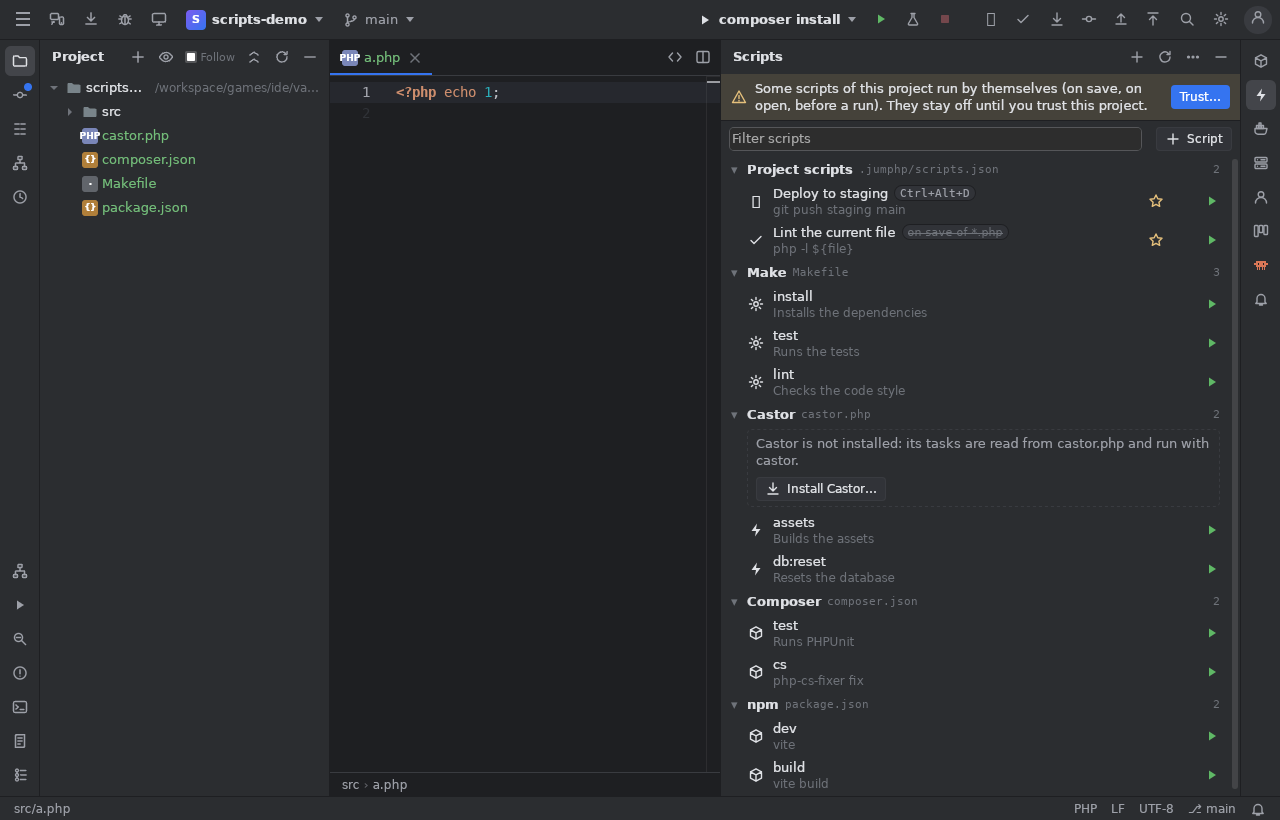
Your scripts
+ Script (or New Script…): a name, an icon, a shell body (several lines), where it runs (a Terminal tab, the Run window, or in the background with a notification), a working folder, environment lines, Ask before running, and for web sites Run in the site's PHP container.
Variables: ${file}, ${dir}, ${project}, ${selection}, ${line}, ${fileName}, ${relativeFile}, ${input:Label} (asked
at each run). They are passed safely quoted: a selection holding $(…) or quotes is never run.
Saved in .jumphp/scripts.json (committed: the team shares them), or with On this computer only in .jumphp/scripts.local.json.
Tasks found in the project
Makefile targets (with their ## help), Castor tasks, composer.json and package.json scripts, justfile recipes, Taskfile tasks.
Right click: run, Make a Script from It…, open the file. A castor.php without castor offers Install Castor… (checked against
its release's checksums). New Castor Task… writes a task into castor.php.
Make them handy
- the ☆ pins one to the tool bar;
- Shortcut, Icon and Events…: a keyboard shortcut; run on save of matching files (
*.scss), when the project opens, or before chosen run configurations; - each script is an action (Run Script: …) in Search Everywhere and a run configuration.
Trust
Scripts never run by themselves until you trust the project once (the banner, or ⋯ > Trust This Project…). The answer is kept on this computer, never in the project. A click always runs.