Board
The Board window (right) keeps the project's work in one place (desktop).
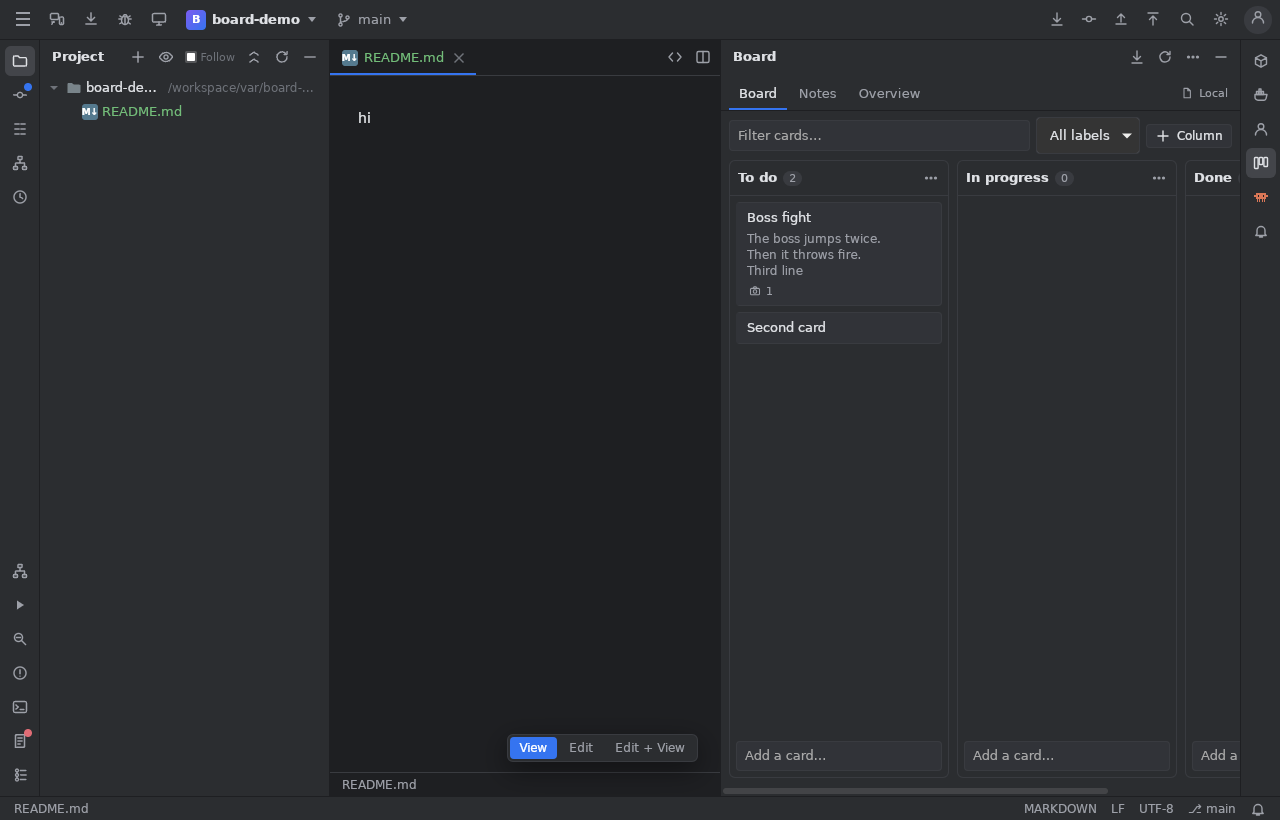
- Kanban: columns and cards; drag and drop, or
Alt+ arrows. A card has a title and a description (Markdown, formatted text and pictures pasted in,Ctrl+Vof a picture copied in another program), a detail view, a checklist. - Notes: Markdown notes of the project.
- Overview: the project at a glance.
- Add a Task… from Search Everywhere.
Where it is kept
A project linked to jumphp.net uses its board on the site (the same as the studio's); otherwise .jumphp/board.json in the project.
Several people at once (jumphp.net)
The board of a jumphp.net project is shared with its members (the owner invites them in the studio, Settings > Share the project: by login or name, or with an invitation link): viewer (reads), editor (changes cards and notes), admin (an editor who also manages the columns and the members). The board, the notes and the shared HTTP collections are visible to the members only.
- Live: what the others change on the site or in their IDE appears within a second (a green dot by the avatars; orange: read every few seconds; red: offline, trying again on its own). The avatars say who is on the board now (a blue ring: in the IDE).
- "X is editing": a card someone has open is marked with their name. It is a soft lock: it can still be changed.
- Never a silent overwrite: a card saved by someone else while you edited it is merged field by field: what only you changed is kept, what only they changed too; for a field you both changed, the Merge the changes dialog asks which version to keep. A note edited by two is merged paragraph by paragraph (the same paragraph changed by both: the last save's).
Issue trackers
Issue tracker…: sync the cards with the issues of GitHub, GitLab, Forgejo / Gitea or a generic tracker (a token per host, or gh).
Cards moved to done close their issue; reopened ones reopen it.
Claude can read and change the same board (its board tools).