Doctrine
The Doctrine window (bottom tool bar; Search Everywhere: Doctrine: …) appears in a project whose composer.json requires
doctrine/orm or doctrine/doctrine-bundle (or that has config/doctrine/). It reads the mapping from the sources, without running
anything: the #[ORM\...] attributes of the classes of the PSR-4 folders (properties and promoted constructor properties) and XML
mappings (config/doctrine/*.orm.xml). Four tabs; the window can take the whole screen (its ⤢ button, Escape gives it back).
What is read: fields (their type, written or inferred from the PHP type as ORM does; length, precision / scale, nullable, unique, id,
generated value, enum type), relations (OneToOne, OneToMany, ManyToOne, ManyToMany; owning / inverse side, mappedBy /
inversedBy, cascade, orphanRemoval, join columns and join tables, with the names the underscore naming strategy gives them),
embeddables and #[Embedded] with their prefix, inheritance (single table, joined, mapped superclasses: inherited fields shown as such,
the discriminator and its map), PHP enums with their cases, repositories, API Platform resources (#[ApiResource]).
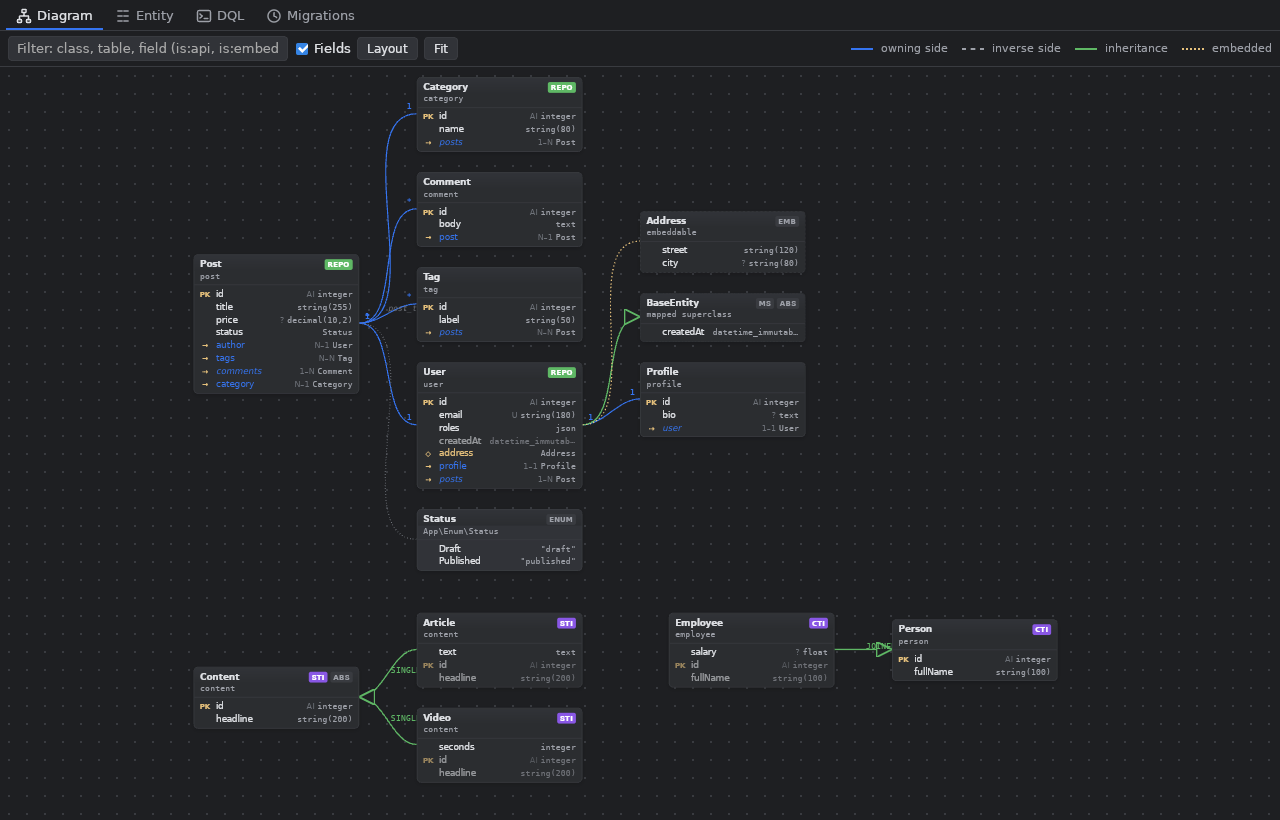
Diagram
- A box per entity, mapped superclass, embeddable and enum used by a field; one edge per relation, drawn from its owning side, with its
multiplicities at both ends (an arrow when it is one-sided, the join table's name on a ManyToMany); inheritance in green (hollow
triangle), embedded classes in yellow (diamond), enums dotted. Badges:
STI/CTI(inheritance),MS(mapped superclass),EMB,API,repo(a click opens the repository). - Drag a box by its title to move it (kept for the project; Layout places them again), drag the background to pan, the wheel zooms,
Fit shows everything. The filter takes a class, a table or a field name, and
is:api,is:embeddable,is:inheritance. - A click on a box shows it with its neighbours only (depth 1 to 3). A click on a relation row follows it: one step further, the path shown as a trail you can go back along. Show all comes back.
- A double click opens the PHP file at the class or the property. Right click: edit the entity, open the repository, the table's data, compare with the table, a DQL query from there, DTOs, copy the class name.
Entity
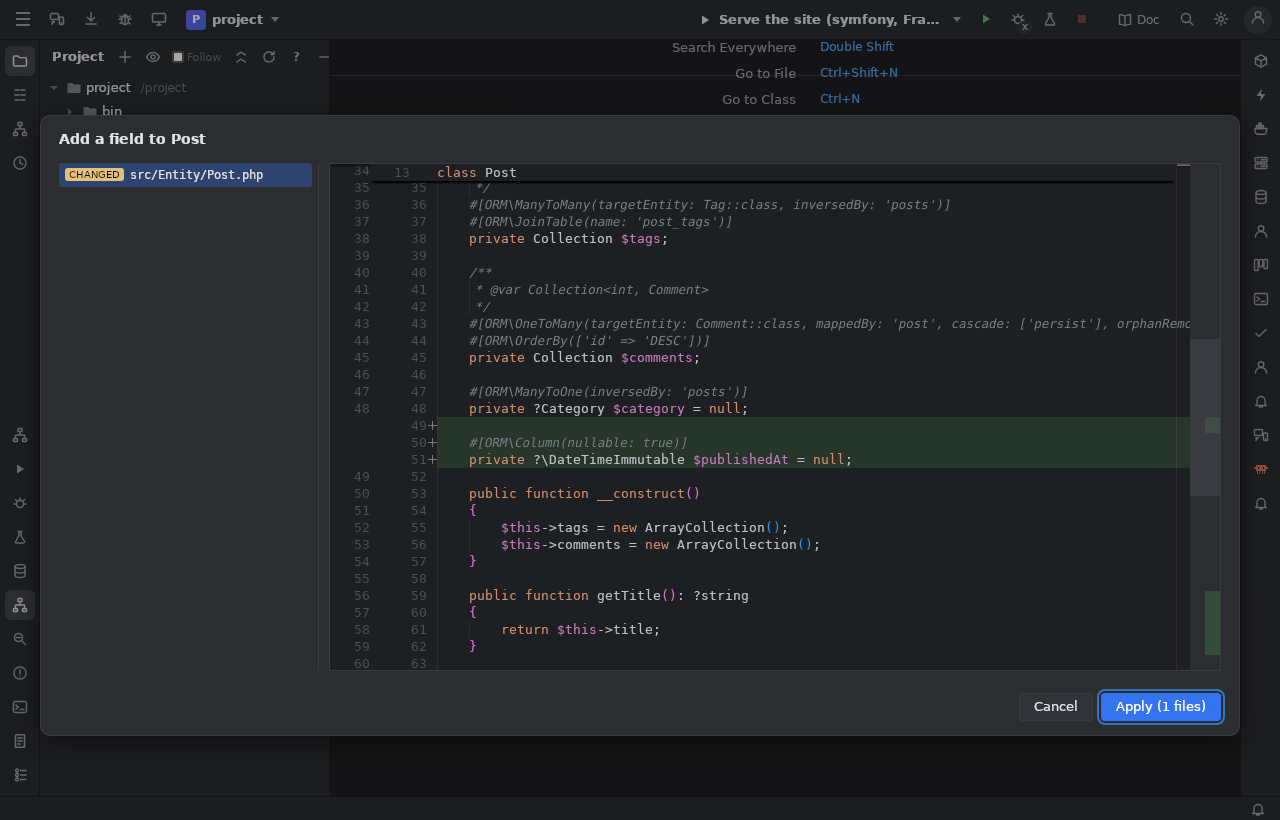
The editor of the entity chosen (in the list, or by a click in the diagram):
- Add a field / edit / remove: every Doctrine type (written with its
Types::constant when ORM cannot infer it), an enum,UuidType; the property, its#[ORM\Column]and its getter / setter in the style of MakerBundle. - Add a relation, written on both sides: the attributes,
@var Collection<int, X>, the collection made in the constructor (the constructor added when there is none), getters / setters,add/removemethods that keep the other side in step, the setter of an inverseOneToOnethat sets the owning side. Options: optional or not, ON DELETE, cascade persist / remove, orphanRemoval, the join table's name. - Rename everywhere: the property,
$this->x, its accessors and their calls (when no other class has a method of that name),mappedBy/inversedByon the other side, DQL strings (alias.xwhere the alias is this entity:createQueryBuilder('p')of its repository,FROM/JOINof the DQL,->join('p.rel', 'r')),findBy(['x' => …])in its repository, Twig{{ entity.x }}; other Twig.xare listed to check by hand. - Generate DTOs:
<Entity>Input(validation constraints,applyTo()) and<Entity>Output(readonly,from<Entity>()) of the fields chosen. - New entity…: class name, table, repository (
ServiceEntityRepository),#[ApiResource], fields typed as lines (name string 120 ?).
Every change is shown as a diff first (one file or several), and written by Apply only if the files did not change since. The code is parsed for positions only and changed by inserting text there: every other byte of the file stays as it was. After a change, the notification offers Make a migration.
- Show the table's data opens it in SQL Results. Compare with the table puts the columns the mapping expects (fields, embedded
ones with their prefix, join columns, the discriminator, the subclasses' columns of a single table) beside the real table: missing,
extra, another type, length, precision or nullability. The connection used is the Database window's: the one chosen before, the one
whose database is
DATABASE_URL's, the only one, or asked (one found in the project is offered).
DQL
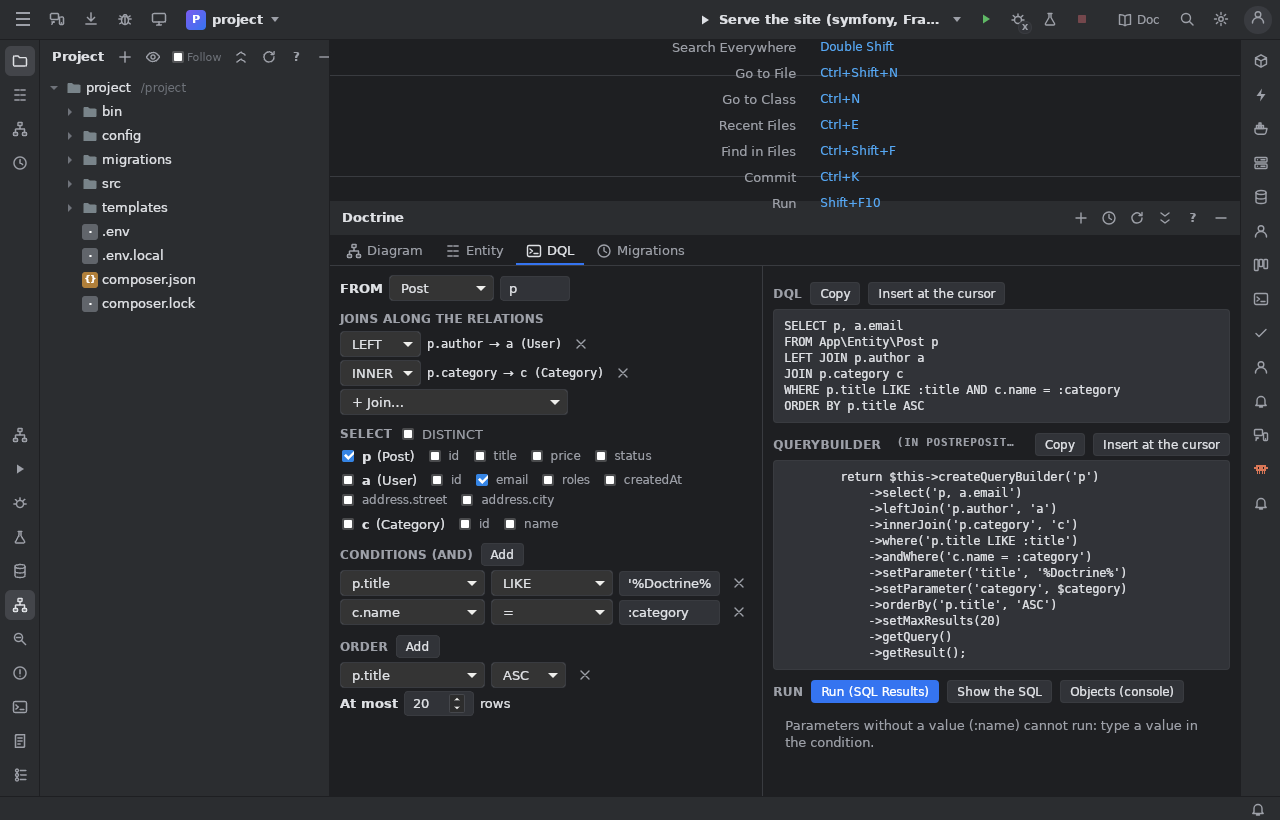
- Completion in PHP strings:
createQuery('…')and the QueryBuilder methods (select,from,join,where,orderBy, … and$qb->expr()->…). AfterFROM/JOIN: the entities; afterJOIN p.: the relations; afteralias.: fields, relations, embedded objects (andalias.embedded.); elsewhere: the aliases, DQL functions and keywords. The aliases come from the DQL, fromcreateQueryBuilder('p')in a repository,->from(X::class, 'x')and->join('x.rel', 'y'). - The builder: root entity and alias, joins along the relations (INNER / LEFT, aliases made for you), aliases or fields to select,
conditions (a value typed becomes a parameter;
:nameis a parameter without a value), order, limit. It writes the DQL and the QueryBuilder code ($this->createQueryBuilder('p')withsetParameter()), to copy or insert at the cursor. - Run:
doctrine:query:dql --show-sqlthrough the Console window's runner gives the SQL, run on the connection into SQL Results; Objects (console) shows what the console dumps.
Migrations
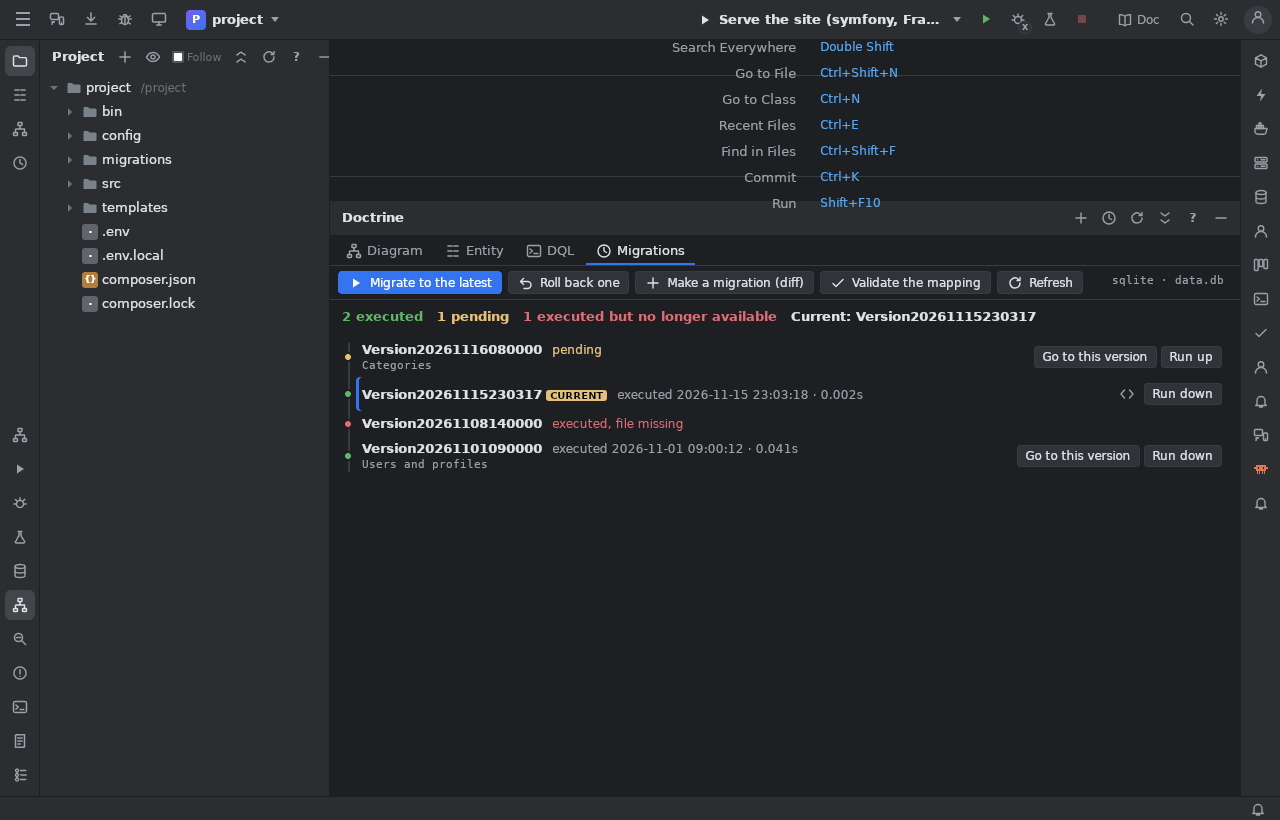
The history of doctrine:migrations:list: executed (date and time), pending, executed but no longer available, the current one.
Migrate to the latest, Roll back one (migrate prev), Go to this version (up or down), Run up / Run down of one
migration, open its file, Validate the mapping (doctrine:schema:validate), Make a migration: the SQL the entities need
(doctrine:schema:update --dump-sql) is shown first, then make:migration (or doctrine:migrations:diff) writes the file, which opens.
Everything runs through the Console window's runner (the site's container, or the local PHP). Before anything that changes the
database a confirmation says what is lost; when the connection is marked production, its name must be typed.
Database schema check
When the site starts (Serve the site, Apply the Compose changes), when an entity or a migration is saved or written by the IDE, and
when the site's output (or an answer of the HTTP Client) holds a Doctrine "table not found" / "unknown database" error, the IDE checks the
database in the background (never in a frame) through the Console window's runner: is the server reachable and the database there, are
migrations waiting (doctrine:migrations:list), do the entities and the tables differ with no migration for it (doctrine:schema:update --dump-sql).
If something is wrong, a banner over the editors says it in plain words ("The database app does not exist.", "2 migrations are not
applied.", "The entity Xxxxa has no table: no migration creates it."), with a badge on the Run widget and in the status bar. Its buttons,
each confirmed (the SQL shown first for a migration) before anything runs: Create the database (doctrine:database:create --if-not-exists),
Generate a migration, Apply migrations, Open the Doctrine window, and Fix everything (create the database, generate a migration,
apply it: the steps are listed in the confirmation, each one only if the one before worked, then the check runs again).
On a production connection (Database window, or APP_ENV=prod) nothing runs by itself, there is no "Fix everything", and every fix
asks for the connection's name. Settings > "Check the database schema by itself" turns the automatic check off; the action
Check the database schema (Search Everywhere, the Doctrine window's header, the status bar badge) runs it whenever you want.
Visual SQL builder (Database window)
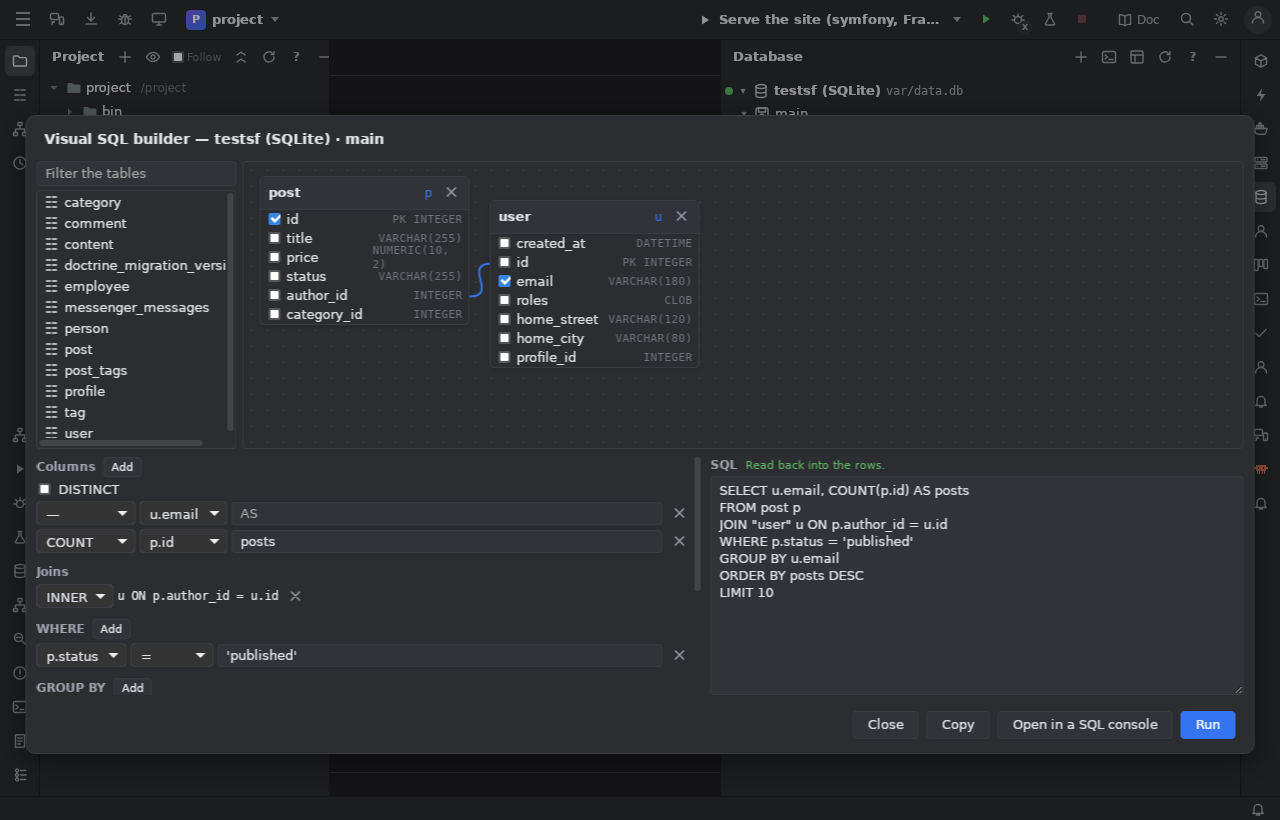
From the Database window's tool bar, or the menu of a database or a table: the tables of the live schema picked in a list, joined by
their foreign keys as they are added (or by dragging a column onto another table's column), columns checked in the table boxes,
aggregates (COUNT, COUNT DISTINCT, SUM, AVG, MIN, MAX) with aliases, WHERE / GROUP BY / HAVING / ORDER BY /
LIMIT as rows. The SQL is written live and can be edited: a plain SELECT (joins, AND conditions, IN, BETWEEN, IS NULL…)
is read back into the rows, anything else (OR, subqueries, functions) is kept as written. Run (SQL Results; the production guard
as in a console), Open in a SQL console, Copy.
Limits
- Annotations (
@ORM\Entitydocblocks) and YAML mappings are not read; attributes and XML are. - Rename finds calls by method name (skipped when another class has a method of the same name) and Twig usages by the variable named after the entity: the preview lists what it found; check it.
- DQL runs and migrations need the project's console (
bin/console) and its database reachable from where it runs.
Code: ide/src/Doctrine/ (MappingReader, EntityWriter + PhpSource, Rename, Dql, MappingCompare, Migrations,
DoctrineCommands), ide/ui/js/doctrine.js, doctrine-layout.js, dql-model.js, sql-model.js, sql-builder.js,
ide/ui/css/doctrine.css. Tests: ide/tests/DoctrineTest.php (fixtures ide/tests/fixtures/doctrine/, the exact code expected in
fixtures/doctrine-expected/ — refreshed with DOCTRINE_EXPECTED_WRITE=1 —, real console outputs in fixtures/doctrine-console/),
ide/ui/js/doctrine-models.test.mjs; screenshots: games/ide/tools/ui-doctrine-check.sh <project>.