Database
The Database window (right) and SQL Results (bottom) work with the project's MySQL / MariaDB and SQLite databases (desktop). PostgreSQL is listed when found but not supported yet.
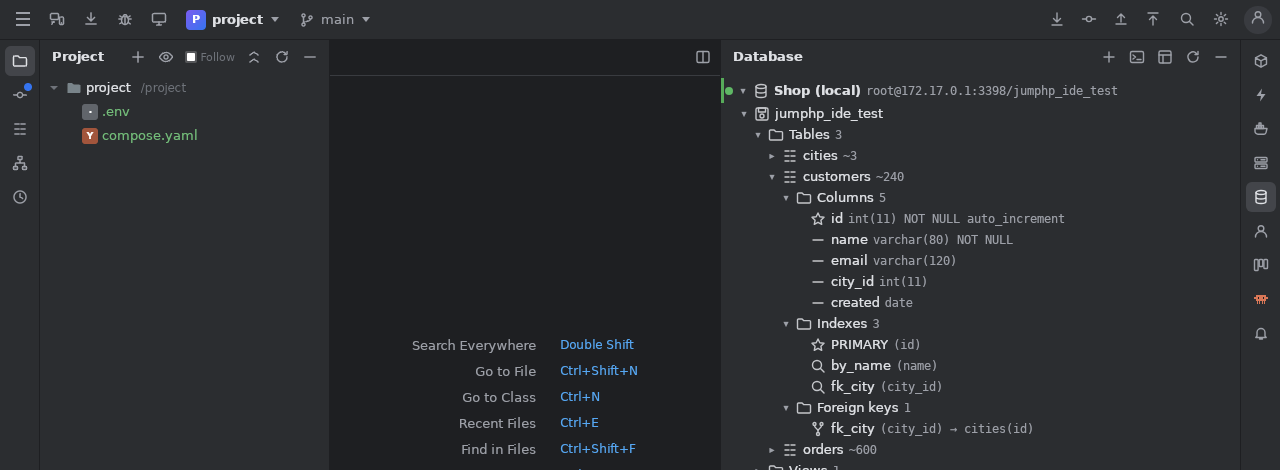
Connections
- Found in this project: Symfony
DATABASE_URL(.env*), LaravelDB_*, the database services ofcompose.yaml, the JumPHP web site's stack. Add makes one a connection. - +: name, driver, host, port, user, database (or the SQLite file), an SSH tunnel through a server of the SSH window, a colour, the production flag.
- Kept in
.jumphp/databases.json(commit it: the team shares them) — never a password. A password is kept on this computer when you ask (~/.jumphp/ide-db-secrets.json), else asked at each connection.
The tree
Databases › tables, views, routines › columns (type, NOT NULL, key), indexes, foreign keys. Double click a table: its data. Right click:
structure (and the CREATE statement), a SELECT in a console, copy the name.
SQL consoles
Open a SQL console: a .sql file of the project (kept out of git) in the editor.
Ctrl+Enterruns the selection, else the statement under the cursor (DELIMITERunderstood). The editor's menu: run the whole file, Explain Plan, Choose the Database Connection… (any.sqlfile of the project).- Tables, columns and aliases (
FROM customers c→c.) are completed from the live schema. - Each statement gives a result tab; pin one (☆) to keep it. History per connection.
Results and data
Up to 10 000 rows per statement, 100 a page; sort by a header, filter. Export: copy or save as CSV, JSON or SQL INSERTs.
A table's data: WHERE and ORDER BY you choose; double click a cell to edit it, delete rows, + Row; Save changes… shows the
statements, then runs them in one transaction.
Production
A production connection has a red bar; a statement that writes is shown in a dialog and runs only after you confirm it.